
August 19, 2026
Safety, Parking and Directional Signs for Factories, Estates and Construction Sites
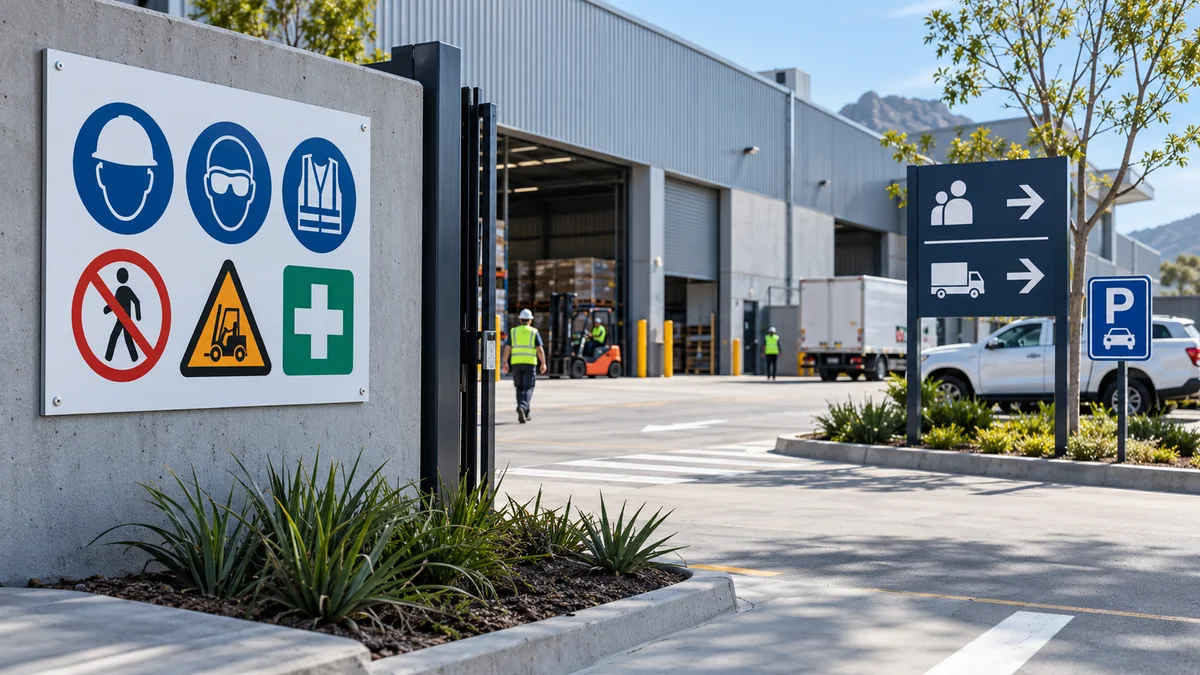
A busy property needs more than isolated signs. Visitors must find the correct entrance, drivers need parking and delivery instructions, and staff need clear safety and access messages. Planning these as one system creates a more orderly site than adding a new board every time confusion occurs.
Map decisions and risks before designing signs
Walk through the property as a first-time visitor, delivery driver and employee. Mark every point where someone must make a decision: the main gate, visitor parking, loading zone, reception route, restricted area and emergency assembly location. Also note hazards and access rules identified by the site’s responsible safety personnel.
Separate signs into functional groups:
- Safety: PPE, hazards, prohibited actions and emergency information.
- Parking: visitor, staff, customer, reserved, accessible and loading areas.
- Wayfinding: reception, deliveries, offices, units and exits.
- Access: authorised personnel, private property, gate and reporting instructions.
- Property identification: factory, estate, warehouse, contractor or project name.
This inventory prevents duplicated or contradictory wording. It also shows where one carefully designed directional panel can replace several small arrows.
Factories and warehouses
Industrial sites combine pedestrians, cars, delivery vehicles and material-handling equipment. Use the entrance to separate visitor instructions from operational safety messages. A driver should be able to find receiving without stopping in a circulation lane, while a visitor should know where to report.
A Chromadeck Factory Sign can identify the facility and key entrances. Add a Chromadeck Directional Sign at genuine route choices, using consistent destination names and arrow styles throughout the property.
Safety instructions should be positioned where the requirement begins, not only on a distant notice board. Keep wording concise and use symbols appropriate to the site’s established safety system. Custom printing does not by itself establish compliance; the responsible safety team should approve regulated content and placement.
Estates and multi-building properties
Estates need a hierarchy that works for residents, visitors, contractors and emergency services. Start with clear property identification, then guide users from the gatehouse to streets, blocks, parking and facilities. Repeating the same visual language makes each new sign easier to recognise.
A Chromadeck Estate Sign is designed for main entrance identification and visitor information. At internal junctions, wayfinding panels can list several destinations in a consistent order. Keep landscaping trimmed and avoid mounting signs where parked vehicles will hide them.
Access signs should distinguish between information and restriction. “Visitors report to reception” tells a user what to do; “authorised personnel only” marks a boundary. Place each at the point where the instruction becomes relevant.
Construction sites
A construction site changes over time, so its signage plan should be reviewed as entrances, hoarding and circulation routes move. The main project board may identify the developer, contractor and professional team, while separate signs manage PPE, delivery access, visitor reporting and restricted zones.
Ellesi’s Chromadeck Construction Site Sign supports project and contractor information in standard or custom formats. Do not overload that board with every operational instruction. Use separate safety and access signs where workers and drivers need to act.
Mount signs securely and away from moving plant. Temporary fencing and hoarding may need specific brackets or supports. Review signs after site changes so arrows do not direct vehicles towards a closed gate or former site office.
Parking and vehicle movement
Parking signs work best before the bay or turn, giving drivers time to respond. Use clear distinctions between visitor, staff, tenant, customer, loading and no-parking areas. A custom Chromadeck Parking Sign can carry business-specific branding and wording, while standard-message products cover common instructions.
At low-light entrances, a reflective finish may help a message become more visible when illuminated by headlights. Ellesi’s Custom Reflective Signs use a reflective face on 0.6 mm Chromadeck. Reflectivity is not a substitute for site lighting and should not be treated as proof of a formal traffic or safety certification.
Make the whole system consistent
Set a simple sign standard for the property:
- one or two typefaces with clear upper- and lowercase use;
- a small colour palette with strong contrast;
- consistent arrows, icons and destination names;
- agreed sizes for close-view, parking and long-view signs;
- repeatable mounting heights where the site allows; and
- a record of every sign’s message and location.
Consistency reduces visual clutter and makes maintenance easier. When a department name or access route changes, update all affected signs rather than adding a sticker or a contradictory board nearby.
Review and maintain the signs
Inspect the site periodically. Clean dirty faces, trim vegetation, tighten or replace failing fixings and remove obsolete signs. Check that reflective surfaces still receive direct light from the intended approach. Review telephone numbers, tenant names and emergency information after organisational changes.
Where regulations or a formal safety standard apply, have the design and placement reviewed by the relevant competent person. Site-specific risk controls take priority over generic artwork.
Planning signage across a factory, estate or construction property? Browse Safety Signs and the wider Chromadeck range, or request a custom quote for a coordinated site package.